

Valentine’s Day’s Cupid has delivered a great set of new features to Node4’s Virtual Data Centre (VDC) service. Over the last 12 months, the platform has expanded to accommodate a whopping 6x growth, attracting a range of new clients across a broad set of industries.
VDC’s primary focus is to support IaaS workloads and is heavily used to support data centre exit migrations, with a cost-effective and low-risk transition. We have been hard at work developing a range of new features that we hope our clients will love.
VDC Cost Manager
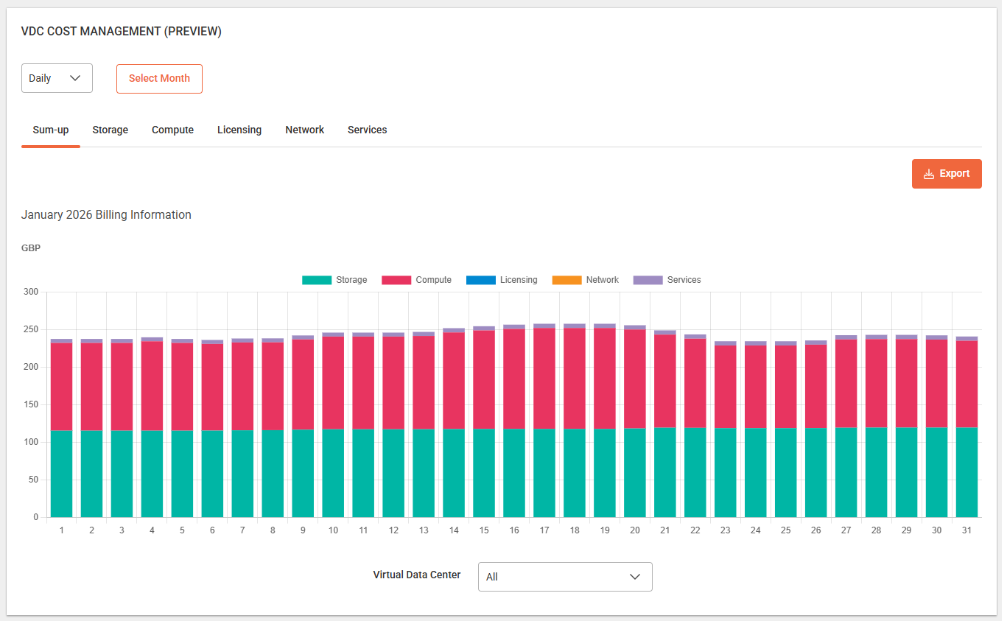
A highly anticipated feature has finally landed as part of the Valentine’s release into Public Preview. VDC Cost Manager is designed to visualise and support client FinOps reporting on billing and resource usage.
VDC Cost Manager can be found in the Nexus portal, which will be your normal entry point to VDC. The below hero view is on the VDC login page and provides Daily, Monthly or Annual views on VDC costs. Users can drill down into either service category (e.g. Storage and Compute) or by VDC. A VDC also acts as a billing container, therefore it’s important to use a meaningful name for the VDC as this is reflected in the reporting and will also appear on the invoice.
There is also a more detailed view in the portal breaking down the costs in a tabular format and a full export of all the backing data in .csv format, allowing clients to review the low-level hourly data by resource.
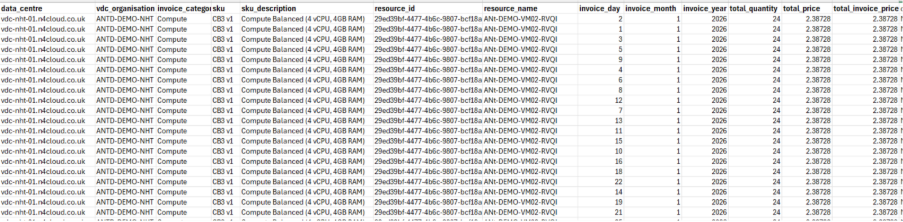
There are a number of data processes that are undertaken. Data is collected every hourly and then a daily process will make this available in VDC Cost Manager, meaning that data will be available from the previous day. We also have several monthly processes that run at the end of each calendar month to produce billing and run integrity checks. This is important to note, although data is available in a month, it will only be “locked in” for invoicing after the billing run has occurred. We have a lot of excitement from customers and we already have backlog, roadmap items for API access to the data and the ability to bring through metadata tags, so watch this space.
New Enhanced Clusters & Instances
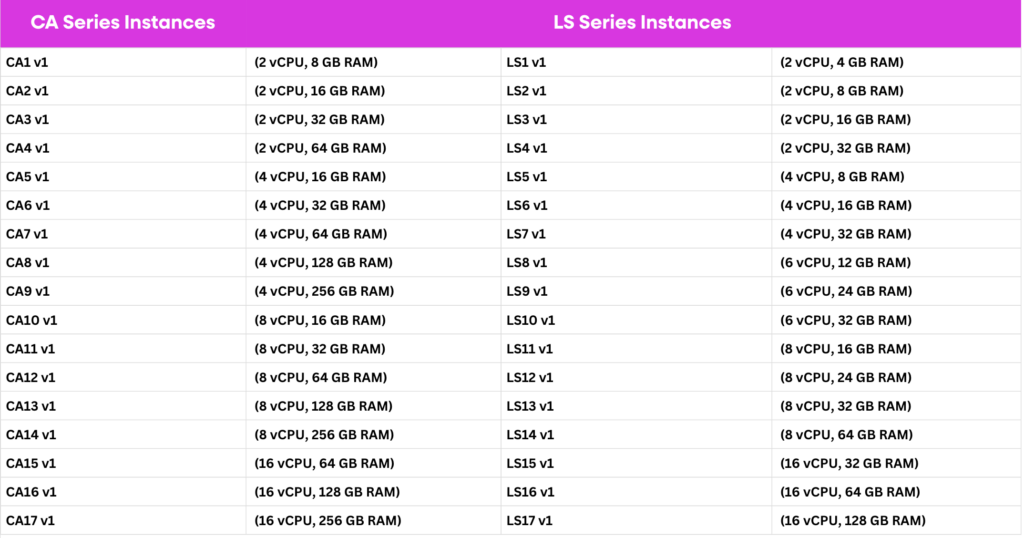
The enhanced cluster offers a toolkit of new services to handle demanding workloads. During many data center migration projects, we have seen workloads that won’t fit a typical cloud environment due to raw performance and latency sensitivity, this is where the enhanced cluster comes in. The enhanced cluster utilises Intel 3.6 Ghz processors in the compute nodes to provide the following new instance types:
- Compute Accelerated Instances (CA Series): 17 new instances all boasting 3.6 GHZ vCPU performance, ideal for demanding database workloads.
- Latency Sensitivity Instances (LS Series): Using the same 3.6GHz processors, LS instances lock a 100% CPU and RAM reservation to the physical hardware providing exclusive resource access. The LS series are perfect for latency sensitivity workloads such as telephony platforms, media streaming and real time control systems.
Virtual Private Storage Array (VSPA)
Our new VPSA service acts a virtual storage array, that is mapped to provide access to dedicated storage. The array provides a range of storage services and is available in the Enhanced Cluster for CA and LS instances. The VSPA has been introduced to support clients who require dedicated storage and extremely high levels of IOPS performance.
Ultra Storage
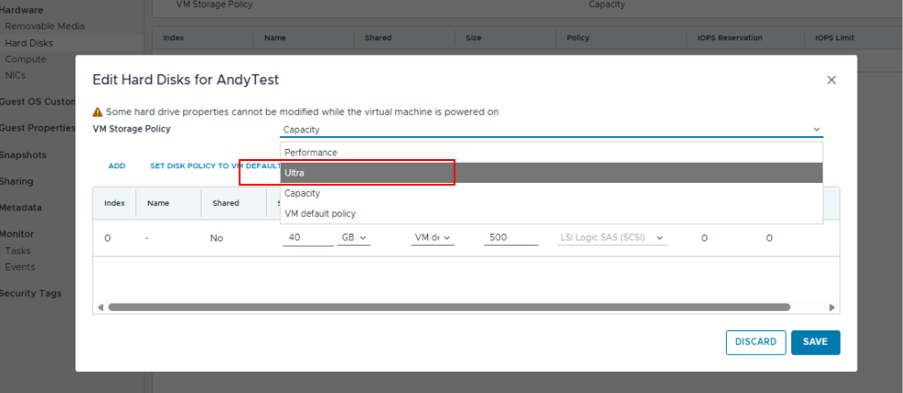
Ultra Storage was added to the platform at the end of last year and is now fully available in the self-service portal. The Ultra tier delivers 10,000 IOPS per managed disk, to complement Performance (3k IOPS) and Capacity (500 IOPS). Ultra storage has now been added to all client accounts and will be an available option in the Hard Disks configuration settings as shown below.
Access to Firewall Logs from the Edge Gateways
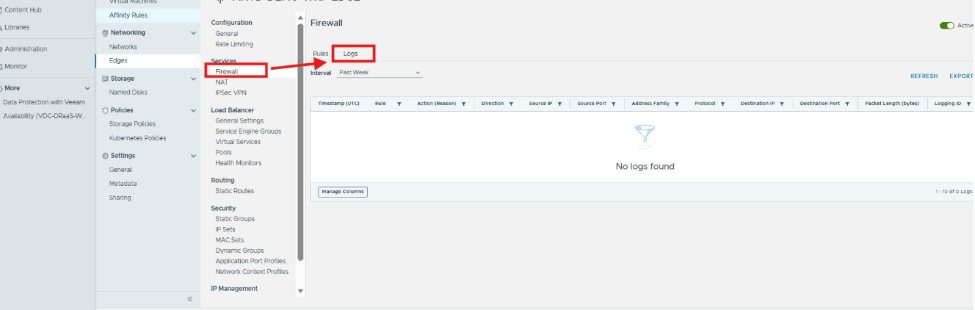
In case you haven’t spotted it yet, clients can get access to logs from the VDC edge gateway for several services including Firewall and NAT. The logs are exportable to support troubleshooting and general oversight. You can find the logs in the supported service as shown below. Remember to enable logs on your firewall and NAT rules so they show up here.
Your Next Step
Whether you’re exploring cost clarity with VDC Cost Manager, planning your next migration, or simply want to understand how these new updates can support your strategy, our specialists are here to help.